Turn spreadsheets into accurate AI forecasts on the fly
Your conversational time-series forecasting partner. Drop Excel workbooks or CSV files into your everyday AI chat client and get instant, foundation-model forecasts with confidence bands and interactive charts.
Chat with Forecast Coach through ChatGPT, Claude Desktop, Gemini, or Cursor in English or your preferred language.
Typical forecast: "Based on 18 months of retail sales, Q4 holiday demand is projected at 14,200 units (+18% YoY) with an 80% confidence interval of [13,100, 15,400]."
Traditional LLMs hallucinate numbers or draw naive linear lines. Forecast Coach runs real time-series foundation models in milliseconds.
Generous free tier. No credit card required. Connect in 30 seconds. • Excel Demo Pack & Interactive Scenarios
The One-Stop Shop to Leap into Modern Forecasting
Stop wrestling with complex Python scripts or misleading linear trendlines. Forecast Coach brings the power of state-of-the-art predictive AI directly into your business discussions.
Foundation Time-Series AI
Runs Amazon Chronos-Bolt in-process. Get pre-trained zero-shot forecasting trained on billions of time points for superior accuracy on unseen data.
Excel & CSV Native
Attach your weekly sales, monthly revenue, or daily inventory spreadsheet. Your AI chat client extracts the series and Forecast Coach models it instantly.
Interactive Chart & Backtest Widget
Renders dynamic visual charts directly within your chat. Switch algorithms on the fly and run live rolling-origin backtests directly in the widget.
Rigorous Uncertainty & Risk
Never make critical decisions based on single-point guesses. Every forecast provides calibrated confidence intervals (P10 to P90) to plan inventory and budgets safely.
Conversational What-If Analysis
Ask questions like "What if growth slows by 10%?" or "How does seasonality affect August?". Get instant updated forecasts and strategic commentary.
Multi-Lingual Collaboration
Communicate naturally in English, Hebrew, Arabic, Spanish, French, German, Japanese, or any language your AI assistant speaks.
Diverse Models Tailored to Every Use Case
No single forecasting model fits every business scenario. Forecast Coach runs a comprehensive multi-algorithm suite in-process — switch models on the fly in the widget or evaluate them side-by-side with automated backtesting.
Chronos-Bolt Foundation Model
LiveLightning-fast deep time series foundation model. Excels at zero-shot forecasting, complex nonlinear trends, and zero-configuration predictions without fine-tuning.
Meta Prophet
LiveAdditive and piecewise linear trend model with L-BFGS optimization. Ideal for business series with strong weekly/yearly seasonality and calendar holiday shocks.
NeuralProphet Hybrid
LiveCombines Prophet interpretable trend and Fourier harmonics with autoregressive neural networks. Native pure-Rust in-process execution with standard and 28-day lag support.
Consensus Ensemble & Backtesting
LiveBlends candidate models via median ensembling and evaluates accuracy across rolling-origin holdouts using MASE against Seasonal Naive 7, recommending the optimal model for your data.
Connect Directly to Your Data Sources
From simple spreadsheets today to native enterprise integrations and e-commerce APIs tomorrow.
Excel Workbooks (.xlsx) & CSV
Drag and drop any spreadsheet directly into ChatGPT, Claude, or Cursor. Automatically parses dates, values, and multi-series columns.
Amazon Seller Central API
Direct connector to sync Amazon FBA sales history, inventory levels, and order velocity for automated restocking forecasts.
Shopify API
One-click connection to pull store transactions, customer order frequency, and product-level demand projections.
Enterprise Internal Databases
Connect natively to SAP S/4HANA, Oracle ERP, PostgreSQL, Snowflake, and BigQuery behind your corporate firewall.
Run Forecast Coach in Your Own Cloud Account
The private edition deploys into your AWS, Google Cloud or Azure account in minutes, licensed offline and stateless by design. Enterprise teams add what they need on request.
Your Own Cloud Account
Your administrator deploys Forecast Coach into your AWS, Google Cloud or Azure account from a console link or one command. Nothing to build, no access to our source, nothing run by us.
Licensed Offline by a Signed Key
A signed activation key is verified inside your deployment, with no call home. Renewals mint a new key automatically and a grace period covers the handover.
Your Data Stays in Your Account
The server is stateless: your series are processed in memory and never stored. Logs stay in your own cloud, with no payload data.
Enterprise Extras on Request
Corporate SSO, network isolation, ERP and data-warehouse connectors, larger model checkpoints and SLAs, scoped with you.
Need more than the private edition?
Tell us about your environment. We scope corporate SSO, network isolation, internal connectors and SLA support around a deployment in your own account.
Contact Enterprise TeamSee Forecast Coach in Action
Works seamlessly inside your AI chat interface — right where your team already works.
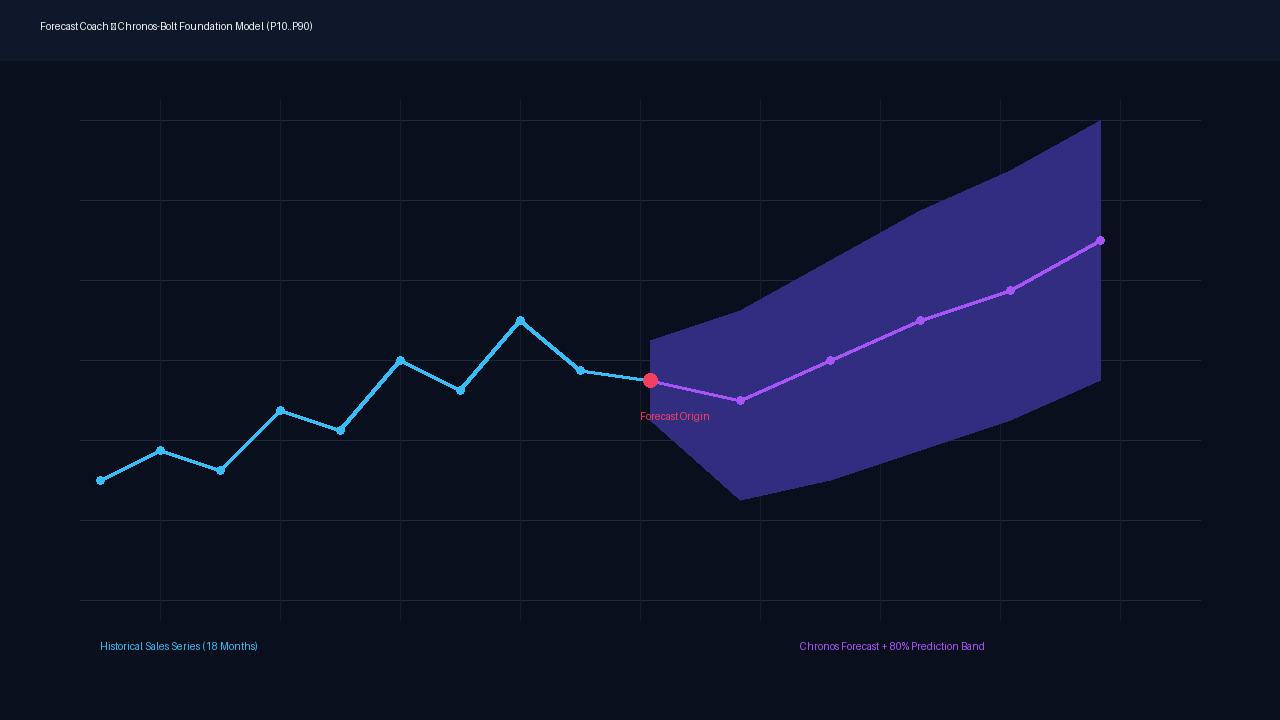
Interactive Forecast Chart Widget
Dynamic SVG chart rendered directly in the chat with historical trends, forecasted trajectory, and calibrated P10-P90 prediction bands.
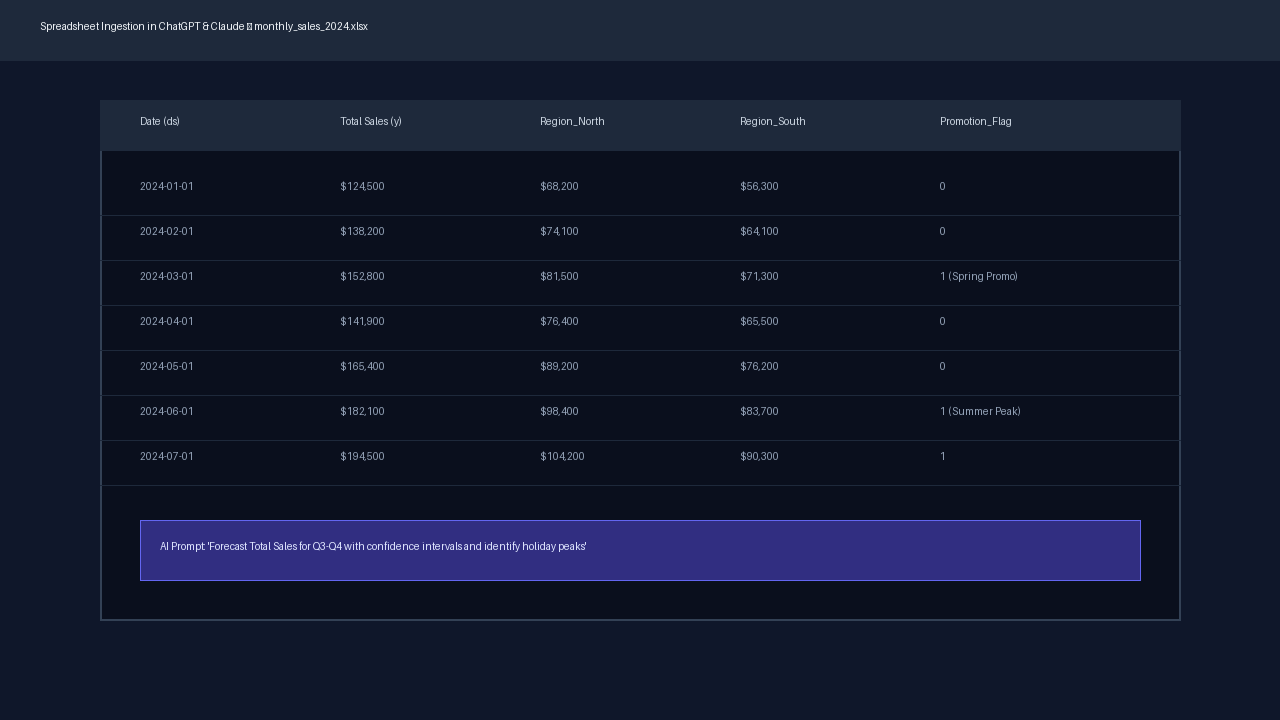
Instant Spreadsheet Ingestion
Drop an Excel workbook into ChatGPT or Claude and ask for demand forecasts by department, region, or SKU.
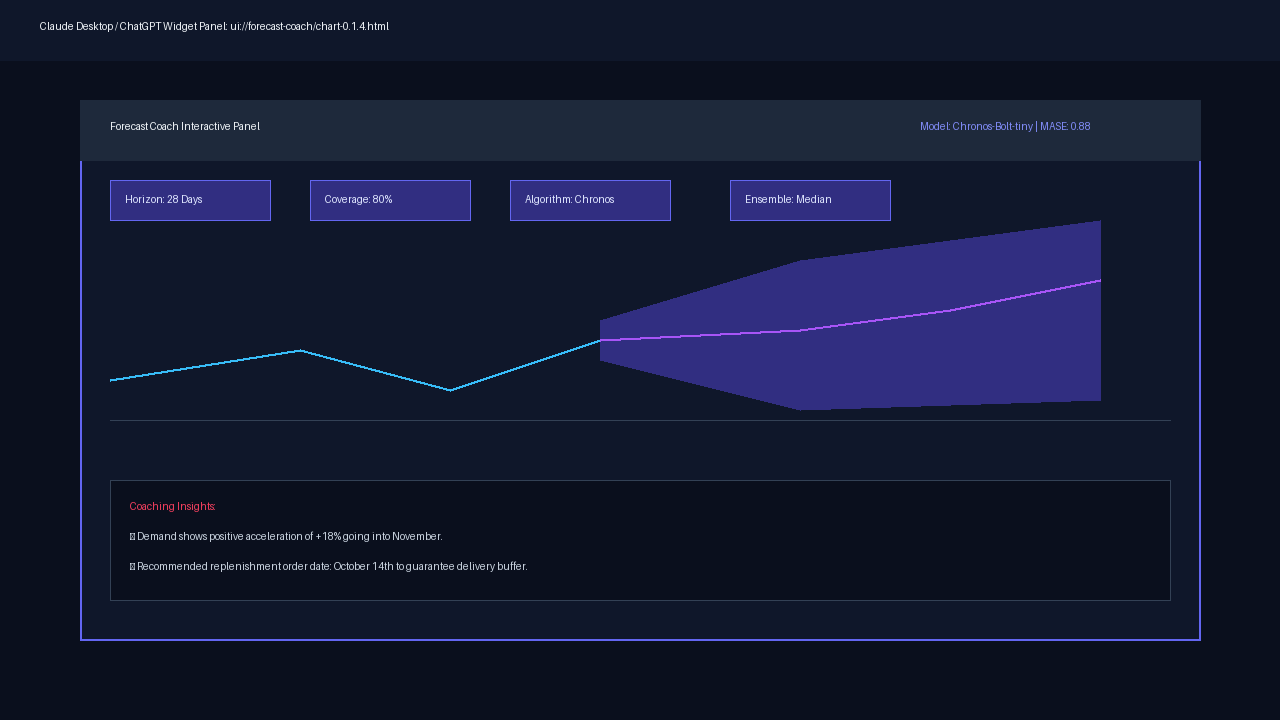
Strategic Business Coaching Notes
Conversational commentary breaking down trend inflection points, seasonality indicators, and actionable replenishment milestones.
Excel Demo Pack & Interactive Scenarios
Download our pre-built workbook with 8 synthetic scenarios, verified date cadences, and copyable prompts to test Forecast Coach instantly in Claude Desktop, ChatGPT, or Cursor.
All series are deterministic synthetic values (seed 9182026). No real business or customer data.
Test Forecast Coach in 3 Simple Steps
Download the Workbook
Grab Forecast_Coach_Demo.xlsx directly — no sign-up or credit card required.
Upload to Your AI Chat
Attach the workbook to Claude Desktop, ChatGPT, Gemini, or Cursor with Forecast Coach installed.
Copy & Paste Any Prompt
Click Copy on any scenario below and send it. Forecast Coach will render interactive charts and empirical confidence intervals.
8 Ready-to-Run Business Scenarios
Each tab demonstrates a specific real-world forecasting problem: growth trends, stockouts, sparse operating days, multi-SKU selection, a quarter-ahead (90-day) horizon, and a holiday quarter planned with declared holidays and closed days.
Daily Retail Demand
14 daysStart here: 182 daily rows with steady growth, weekly shopping cycles, and realistic variance.
@Forecast Coach Use the Daily_Retail worksheet in the uploaded workbook. Use Date as ds and Units_Sold as y, including all 182 data rows. Forecast the next 14 days after the last observation with freq="D". Show the forecast widget and summarize the outlook. Report the empirical band coverage and its basis returned by the tool; do not assume a nominal coverage.
Stockouts vs. Genuine Zeros
14 daysLearn how missingness works. 7 stockout days remain blank (null), while 2 true zero-sale days remain numeric 0.
@Forecast Coach Use Stockouts_Zeros. Use Date as ds and Units_Sold as y; use Observation_Status only to interpret missingness. Keep every date. Send blank values for stockout or missing_report as null and retain both observed_zero values as numeric 0. Forecast 14 days after the final row with freq="D". Show the forecast widget and report the measured band coverage and basis.
Opening-Calendar / Sparse Grid
14 daysA market stall open only Mon/Wed/Fri (105 blank closures). Demonstrates sparse daily grids without dropping dates.
@Forecast Coach Use Open_MWF, with Date as ds and Units_Sold as y. The stall opens only Monday, Wednesday and Friday. Keep every calendar date and send blank cells as null; preserve the genuine observed_zero as 0. Forecast the next 14 calendar days with freq="D". Show the raw plugin result and explain that predictions on closed dates are not applicable. Do not assume the model has a future opening-calendar feature. Report any missing-data or model-limit warnings.
Weekly Wholesale Orders
8 weeks104 weekly Sunday week-ending labels spaced exactly 7 days apart. Models 2-year trend and annual seasonality.
@Forecast Coach Use Weekly_Orders, with Date as ds and Orders as y. Dates are Sunday week-ending labels exactly seven days apart. Forecast the next 8 weeks after the last row with freq="W". Do not relabel the data as daily. Show the forecast widget, describe the outlook, and report the empirical band coverage and its basis.
Monthly SaaS Revenue
6 months5 years of monthly revenue labeled on month starts (MS). Highlights year-end Q4 renewals and macro trajectory.
@Forecast Coach Use Monthly_Revenue, with Date as ds and Revenue_USD as y. Each date is the first day of the month represented by that monthly revenue. Forecast the next 6 months after the last observed month with freq="MS". The first forecast label should be 2026-09-01. Show the forecast widget and report the measured band coverage and its basis.
Multi-SKU Target Selection
14 days3 products on one calendar: growing (Blue), stable (Red), and declining (Bundle). Tests single-series isolation.
@Forecast Coach Use Multi_SKU and forecast only SKU_1041_Blue_Units using Date as ds. Do not use SKU_1042_Red_Units, SKU_2200_Bundle_Units, or a combined total. Forecast the next 14 days with freq="D" and show the forecast widget. Report the empirical band coverage and its basis.
A Quarter Ahead from a Year of Daily Sales
90 daysA full year of daily café sales (365 rows): weekly rhythm, gentle growth and a few quiet holidays. Forecast a whole quarter, 90 days, in one call.
@Forecast Coach Use the Cafe_Year worksheet in the uploaded workbook. Use Date as ds and Cups_Sold as y, including all 365 data rows. Forecast the next 90 days (about three months, 2026-09-18 to 2026-12-16) with freq="D", horizon=90. Show the forecast widget and summarize the quarter ahead month by month. Report the empirical band coverage and its basis returned by the tool; do not assume a nominal coverage.
Plan the Holiday Quarter
92 daysTwo years of daily gift-shop sales (731 rows) with a yearly rhythm, Halloween, Black Friday, a Christmas rush and closed days. Two years is the minimum for Prophet to learn a yearly pattern, which the one-year Cafe_Year cannot show. Declare the holidays and forecast the whole quarter, 92 days, with Prophet.
@Forecast Coach Use the Holiday_Quarter worksheet in the uploaded workbook. Use Date as ds and Units_Sold as y, including all 731 data rows from 2024-09-30 to 2026-09-30, and send the four blank closed-day cells as null. Forecast the holiday quarter, 2026-10-01 to 2026-12-31, with algorithm="prophet", freq="D", horizon=92; holidays are fitted only by Prophet. From the holiday table in E1:K9, send every open row as one holidays entry {name: Holiday, dates: [Past_Date_1, Past_Date_2, Future_Date], lower_window, upper_window}, and put all three dates of every closed row in closed_dates. Show the forecast widget and summarize October, November and December, pointing out Halloween, Black Friday, the Christmas rush and the closed days. Explain in one plain sentence that Prophet learns a yearly pattern only from at least two full years of history: this sheet has two, while the one-year Cafe_Year sheet is too short for one. Report each holiday effect the tool returns, and the empirical band coverage and its basis; do not assume a nominal coverage.
Forecast Coach enforces strict data hygiene. Test these two edge cases to see responsible AI guardrails in action.
Target-Selection Guardrail
Clarification Prompt (No Guessing)Asks to forecast Multi_SKU without naming a column. The assistant should ask which SKU to forecast rather than silently guessing.
@Forecast Coach Use the Multi_SKU worksheet to forecast the next 14 days.
Cadence Guardrail
Refusal / Cadence WarningSends weekly Sunday dates with freq="D". The model must decline the mismatch rather than silently resampling dates.
@Forecast Coach Use Weekly_Orders, Date as ds and Orders as y. Send the dates unchanged and request a forecast with freq="D", horizon=14.
Input Contract & Best Practices
Essential rules from the START_HERE guide to guarantee high forecast fidelity across all platforms.
Actual Blanks vs. Zeros
Empty value cells serialize as null. Never drop their dates, write the text "null", or replace stockouts with 0. Numeric 0 means an actual zero observation.
One Regular Grid Per Call
Use every row in order. Daily includes weekends; weekly is exactly 7 days apart; monthly uses month starts. No future placeholder rows.
Choose One Explicit Target
Forecast Coach processes one (ds, y) series per call. When multiple product columns exist, select one explicitly or request a summed total.
Read Empirical Coverage Basis
Always inspect the returned empirical band.coverage and band.basis (e.g. 80.3% measured on historical e-commerce), rather than assuming nominal 80%.
Add Forecast Coach to Claude
Forecast Coach is published in the Claude connector directory, so it connects in one click from claude.ai or Claude Desktop, and the interactive forecast widget renders right inside your conversation.
Open the directory listing
Open Forecast Coach in the Claude connector directory, and sign in to Claude if asked.
Click "Connect for your team"
Or open the arrow beside it for the other connect options. Forecast Coach is free and needs no API key or extra sign-in. Once connected, it is available in both claude.ai and Claude Desktop.
Start forecasting
Attach any Excel workbook (.xlsx) or CSV file and ask: "Forecast our sales for the next 4 quarters".
Prefer to add it by URL? Use a custom connector instead
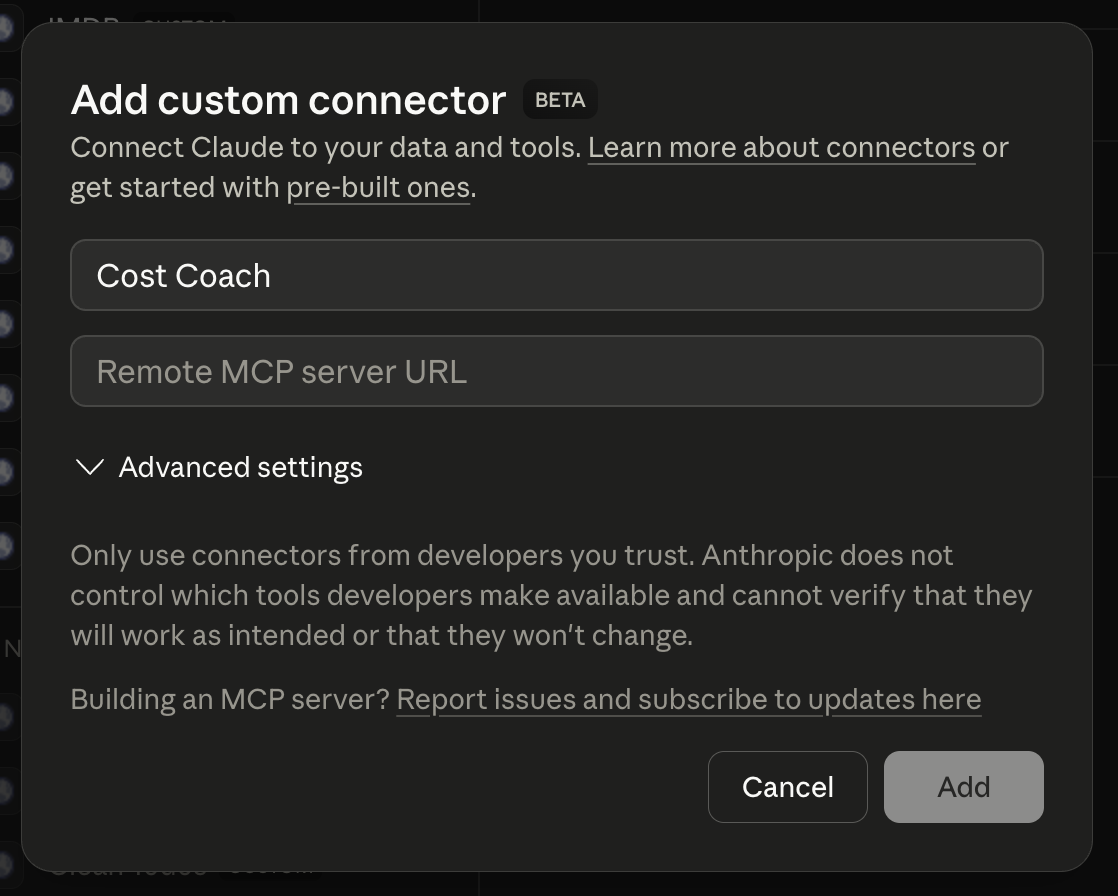
In claude.ai or Claude Desktop, open Settings → Connectors, click +, choose Add custom connector, name it Forecast Coach, paste the URL below and click Add.
Remote MCP Server URL
https://forecast-coach.us-west.pmcp.run/mcp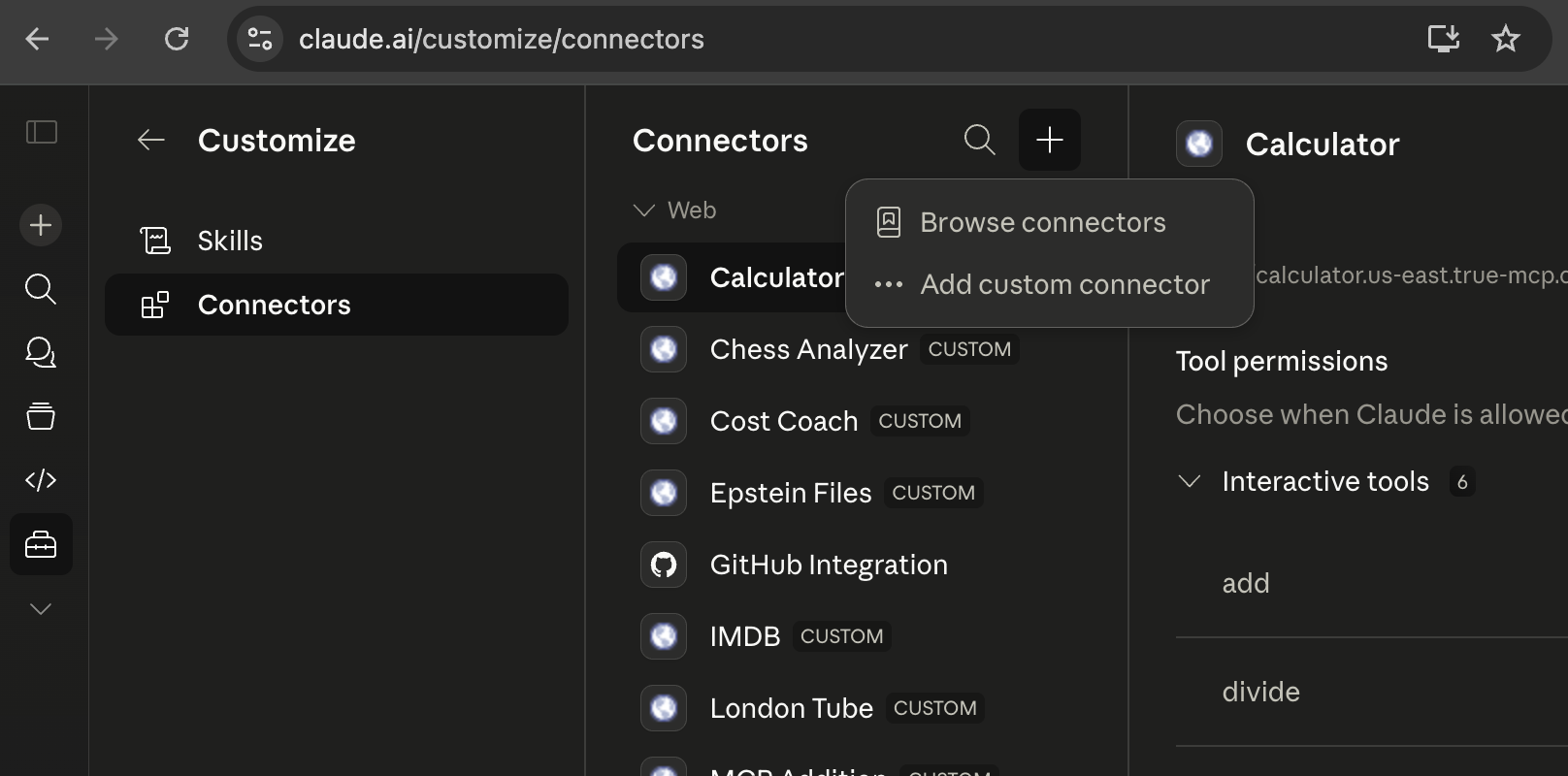
Install in ChatGPT
Forecast Coach connects to ChatGPT as a custom MCP connector. Enable Developer Mode in your settings to install in less than a minute.
Open Connector Settings
Go to chatgpt.com/gpts/mine → Settings → Connectors, open Advanced Settings, and enable Developer Mode.
Create App / Connector
Click "Create app" to add a custom MCP connector. ChatGPT will ask for a name and server endpoint.
Enter Forecast Coach URL
Name: Forecast Coach. Paste the remote MCP server URL shown below into the Remote MCP server URL field, then click Save.
Drop spreadsheet & forecast
Upload any CSV or Excel file and ask: "Forecast demand for the next 30 days and show the prediction chart."
Remote MCP Server URL
https://forecast-coach.us-west.pmcp.run/mcpOther MCP Clients & Editors
Connect Forecast Coach directly from Cursor, Claude Code, or any MCP-compatible environment.
Cursor Setup
- 1Click the button below for one-click installation, or paste the config block into ~/.cursor/mcp.json:
Or copy the JSON block below into ~/.cursor/mcp.json:
{
  "mcpServers": {
    "forecast-coach": {
      "url": "https://forecast-coach.us-west.pmcp.run/mcp"
    }
  }
}Start Asking Real Business Questions
Ask anything about your time series in natural language. Here are examples business teams use daily:
“Here is our monthly revenue spreadsheet for the last 2 years. Forecast Q3 and Q4.”
Predicts upcoming revenue trends with seasonality and upper/lower bounds for budget reconciliation.
“Predict weekly unit demand for our top 5 SKUs through the holiday shopping peak.”
Generates SKU-level replenishment forecasts to prevent stockouts while minimizing holding costs.
“Based on early ticket sales registration curve, will we exceed our 5,000 attendee hall capacity?”
Models cumulative event registrations against venue caps to trigger overflow logistics.
“Forecast server API requests for the next 30 days and flag potential traffic spikes.”
Projects daily server loads with confidence intervals to size cloud infrastructure proactively.
“If summer demand accelerates by 15% due to our new ad campaign, how will inventory hold up?”
Applies scenario adjustments to baseline forecasts to evaluate marketing ROI and stock buffers.
“How accurately would the model have predicted last quarter using historical data up to December?”
Performs historical walk-forward backtesting to prove accuracy before betting operational budgets.
Simple, Transparent Editions
Start free in your chat today, or deploy the private edition into your own cloud account in minutes.
Community Server
Ideal for individuals, business managers, analysts, and teams using ChatGPT, Claude, Gemini, or Cursor.
Business Server
Your own Forecast Coach in your own AWS, Google Cloud or Azure account. Your administrator deploys it from a console link or one command, and your data never leaves your account.
Enterprise Server
Dedicated deployment on a dedicated AWS account with auxiliary MCP servers for direct ERP and data warehouse integration.
Detailed Edition Comparison
Compare architecture, security, models, and integration capabilities across all three deployment tiers.
| Dimension / Feature | Community Server | Business Server | Enterprise Server |
|---|---|---|---|
| Target Audience | Individual planners, analysts, proof-of-concept testing | Business units & growing companies needing private infrastructure | Large enterprises requiring compliance, ERP integration & custom SLAs |
| Pricing & Licensing | Free ($0) | $249 / month | Pay-for-usage (Tailored enterprise licensing) |
| Licensing & renewal | None required | Activation key from your subscription page; renewals mint a new key automatically, with a grace period after the paid period | Tailored |
| Hosting Environment | Public multi-tenant serverless cloud (pmcp.run) | Your own AWS, Google Cloud or Azure account, deployed by your administrator from a console link or one command | Dedicated AWS account (or customer VPC) |
| Time to deploy | Install the connector in your chat in under two minutes | About a minute on AWS, under a minute on Google Cloud, a few minutes on Azure | Scoped engagement |
| Authentication & Access | No login / Anonymous (Zero credentials or sign-up) | Public HTTPS endpoint gated by your signed activation key; no accounts to manage (corporate single sign-on: Enterprise) | Corporate SSO & OAuth 2.0 + fine-grained IAM & RBAC policies |
| Data Retention & State | Stateless (Zero data stored, no DB/disk) | Stateless (series processed in memory, never stored; everything stays in your account) | Stateless (Zero data stored, air-gapped options available) |
| Forecasting Engine | 8 SOTA models (Chronos-Bolt, NeuralProphet, Prophet, Ensembles, Baselines) | The same 8 models as Community; a larger Chronos-Bolt checkpoint as a backtest option (coming) | Custom & fine-tuned models (Larger Chronos checkpoints, industry-tailored weights) |
| Data Intake & Integration | Excel (.xlsx) & CSV file upload via chat | Excel (.xlsx) & CSV file upload via chat | Additional MCP servers for direct ERP/DB integration (SAP, Oracle, Snowflake, Postgres) |
| Network Isolation | Public HTTPS endpoint | Public, licence-gated HTTPS endpoint in your own account; your data stays in your cloud (network restriction: Enterprise) | Dedicated cloud account, VPC peering, PrivateLink support |
| Audit & Logging | Standard test-asserted latency/status logs (no payload data) | Logs in your own account (CloudWatch, Cloud Logging or Container Apps), no payload data | Full enterprise audit logging, SIEM integration, dedicated compliance reporting |
| Support & SLA | Community support | Standard email & business-hours support | Dedicated SLA, enterprise engineering onboarding & architecture support |